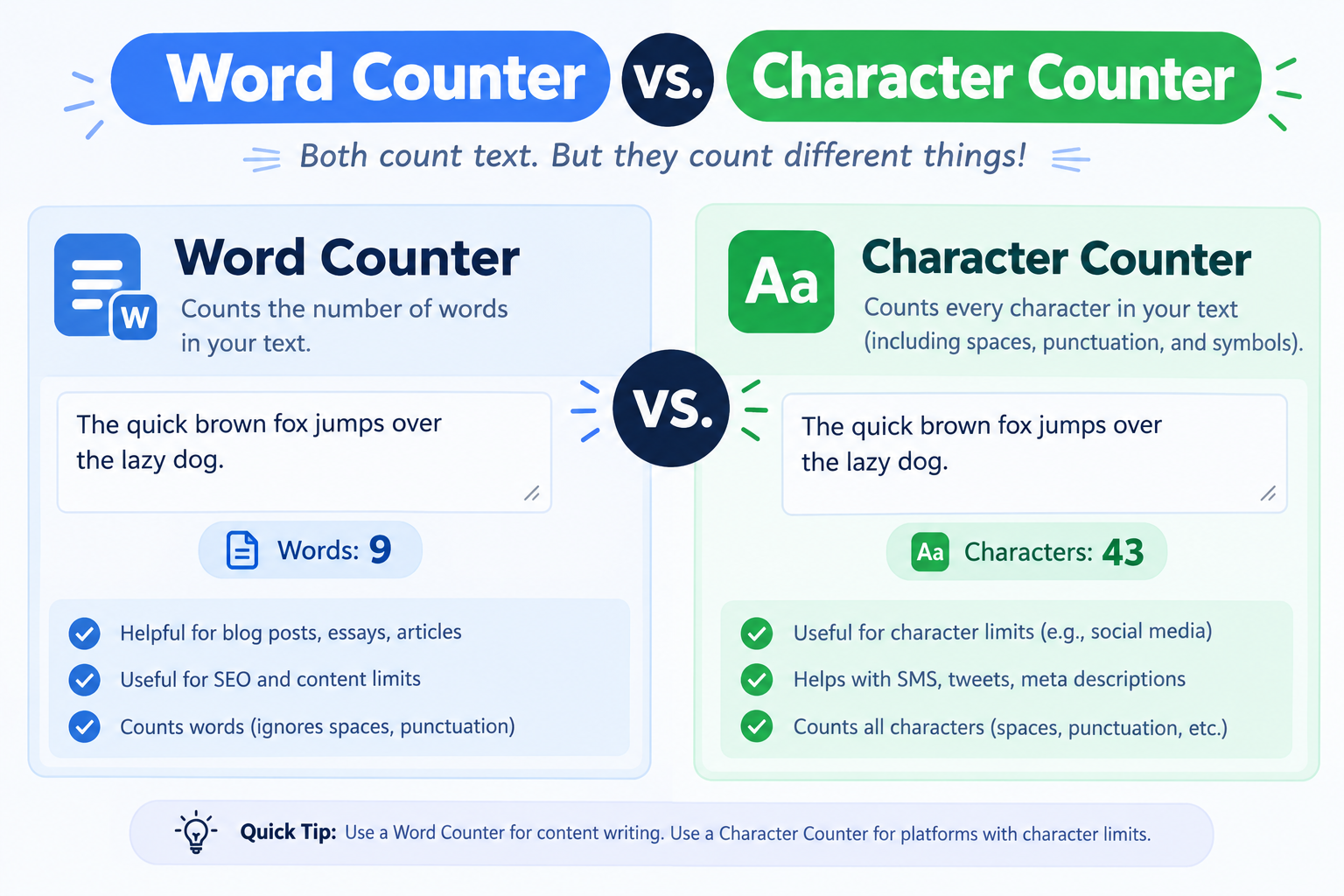
The core difference in one sentence
A word counter tells you how many words you've written. A character counter tells you how many individual characters your text contains — including letters, numbers, spaces, and punctuation.
That's the whole difference. But which one you need depends entirely on where the text is going.
An essay has a word limit. A tweet has a character limit. A meta description has a character limit. A blog post usually has a target word count. Once you know which limit applies, you know which counter to reach for.[reference:0]
If the limit is described in words, use a word counter. If it's described in characters, use a character counter. If you're not sure, use a tool that shows both — like the Textify Word Counter.
When word count is the right metric
Word count is the standard measure for any long-form writing where the content matters more than the exact display width. Here's where it applies:
Academic essays and assignments
Universities almost always specify word limits, not character limits. A typical undergraduate essay runs 1,500–2,500 words, and most institutions allow a 10% margin above or below the stated limit.[reference:1] If you're 200 words over, you have a problem — and a character counter won't help you spot it.
Blog posts and articles
Most content teams set word targets: "we need a 1,200-word post," or "this should be at least 2,000 words." Search engines don't enforce word count, but longer content tends to rank better for competitive topics. A word counter tells you instantly whether you've hit the target.
Speeches and scripts
If you're writing a speech, you care about how long it takes to say — which depends on word count. Most people speak at roughly 130–150 words per minute, so a 5-minute speech is about 700 words. The Speaking Time Calculator converts word count directly into speaking time.
Books and long-form projects
Novelists track daily word counts. Nonfiction authors measure chapters in words. Word count is the unit of progress for any project measured in thousands of words.
Word CounterCount words, characters, sentences, and paragraphs instantly
When character count is the right metric
Character count is the standard measure for anything that has to fit inside a fixed display box — social posts, search snippets, SMS messages, and database fields.
Social media posts
Every major platform enforces character limits. X (Twitter) allows 280 characters for standard accounts. Instagram captions cap at 2,200 characters. LinkedIn posts allow 3,000. TikTok captions allow 4,000.[reference:2] Go over, and your text either won't publish or gets truncated mid-sentence.
SEO meta titles and descriptions
Google truncates title tags around 60 characters and meta descriptions around 155–160 characters. On mobile, meta descriptions show closer to 120 characters. If your description is 200 characters, the last 40 — often where you put the call to action — will never be seen.[reference:3]
SMS messages
A standard SMS message is 160 characters. Go over, and the message splits into multiple texts — which looks unprofessional and can cost more if you're using a bulk SMS service. Emoji drops the limit to 70 characters because of how Unicode encoding works.[reference:4]
Ad copy and buttons
Google Ads headlines are 30 characters. Facebook ad headlines are 40 characters. Button text on a landing page might be 15 characters. When the display space is fixed, character count is the only metric that matters.
Sentence CounterCount sentences and check reading flow
Platform limits cheat sheet
Here are the character limits you'll run into most often. Save this table — it saves a lot of guesswork.
| Where | Limit | What happens if you go over |
|---|---|---|
| X / Twitter post | 280 characters | Hard limit — won't publish. Links count as 23 characters regardless of length. |
| Meta description | ~160 characters | Google truncates at ~155–160 on desktop, ~120 on mobile. |
| Meta title | ~60 characters | Truncated in search results. Measured in pixels, not characters. |
| Instagram caption | 2,200 characters | Folds at ~125 characters behind a "more" link. |
| LinkedIn post | 3,000 characters | Folds at ~210 characters behind "see more." |
| SMS (single message) | 160 characters | Splits into multiple messages. Drops to 70 with emoji. |
| YouTube title | 100 characters | Cut around 60 characters in search results. |
| Google Ads headline | 30 characters | Hard limit per headline. |
Why most tools show both
In practice, you almost never need only one metric. A single piece of text often has to satisfy multiple constraints:
- A blog post needs a target word count and a meta description within a character limit.
- A tweet needs to fit in 280 characters, but you might also want to know how many words it contains for readability.
- An essay has a word limit, but the title page needs a character count for the header field.
That's why the Textify Word Counter shows everything at once: words, characters (with and without spaces), sentences, paragraphs, and estimated reading time. One paste, all the numbers you need.
Three mistakes people make
1. Using word count for social media
"My tweet is only 45 words" tells you nothing about whether it fits in 280 characters. A 45-word tweet can easily run 300+ characters, especially with hashtags and links. Always check the character count before posting.
2. Forgetting that spaces count
Character counters typically show two numbers: with spaces and without spaces. Platforms almost always count spaces. A sentence that looks like 140 characters might actually be 165 once spaces are included.[reference:5]
3. Ignoring mobile truncation
A meta description that fits perfectly at 158 characters on desktop might get cut at 120 on mobile. If the important part — your keyword or call to action — sits at the end, mobile users never see it. Front-load the value.
Paste your final draft into the Word Counter once. If you're writing for the web, check the character count for your title and meta description. If you're writing long-form, check the word count. Two seconds of checking saves a re-edit later.